The folder anatomy
Lesson 2 of 7 · Module 01 · Set Up Your Command Center
Before Claude can keep track of your work, you have to give your work an address.
Here is the rule the whole system rests on: one project equals one folder. Not one folder with three half-finished things crammed inside. Not the same client living in two places because you forgot you already made it. One project, one folder, every time.
That sounds obvious. Walk through most people's machine and it isn't true. There's a "stuff" folder. There's a client whose work is split between Desktop and Downloads. There's a funnel that lives inside last month's research folder because that's where you happened to be sitting when you started it. Claude can't reason about a mess like that, because it has no reliable place to look and no reliable place to put things. Every session starts from zero.
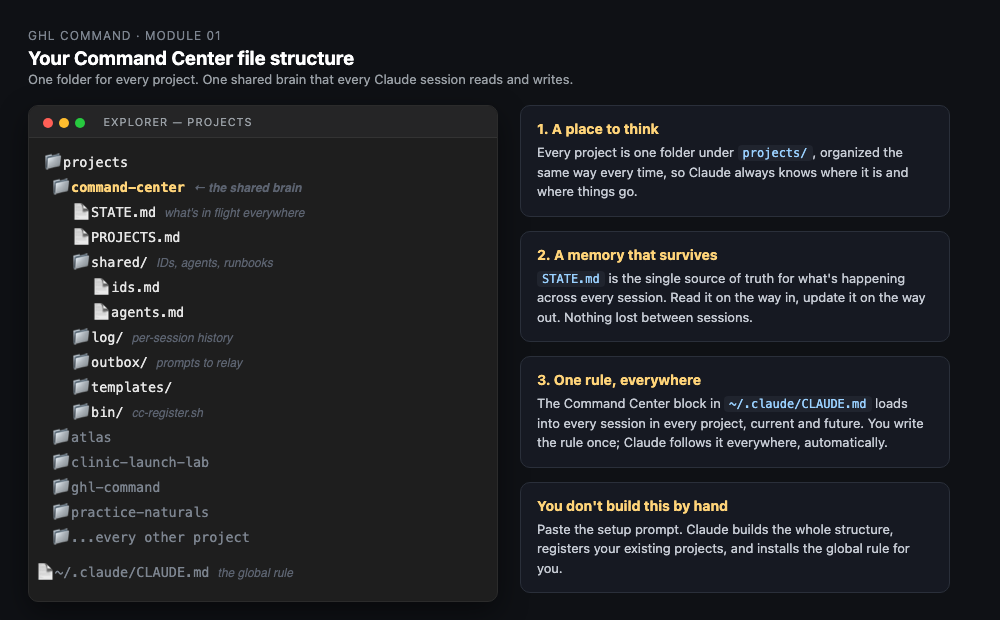
So everything lives under one roof. Call it your projects root. On most machines that's ~/projects. Inside it, every project gets its own folder, and they all sit at the same level:
~/projects/
  client-acme/
  client-bright-smiles/
  practice-naturals/
  command-center/
Each project folder holds that project's work and one small file called CLAUDE.md. That file is the project's name tag. It tells any Claude session what this project is, what it's for, and which rules it follows. When Claude opens a project, it reads that file first and knows exactly where it landed.
The command-center folder you see in there is the shared brain. It sits at the same level as your projects, not inside any one of them, because it belongs to all of them. We build that in the next lesson. For now, just know it has an address too.
Notice what this is not. It is not a tagging system. It is not a database. It is not something you maintain. It is folders. The reason it works is that it's boring and it doesn't move. Claude always knows where it is and where things go, because the layout never changes.
You don't have to sort this by hand. The Prompts Pack has a prompt that points Claude at your machine, takes inventory of what you already have, and proposes a clean layout before it touches anything. You approve the moves. Claude does the dragging.
Grab prompt 02 from the Prompts Pack and run the inventory. Then come to Lesson 3, where we build the shared brain that lives in that command-center folder.
Jerry